Opis
Wprowadzenie do AiShot
W 2026 roku Twoja cyfrowa osobowość to coś więcej niż tylko zdjęcie profilowe—to oświadczenie. Niezależnie od tego, czy budujesz markę osobistą, aktualizujesz profil LinkedIn, czy tworzysz unikalną tożsamość do gier i mediów społecznościowych, jakość Twojego awatara ma znaczenie. Poznaj AiShot, zaawansowany generator avatarów AI, który obiecuje zamienić zwykłe selfie w oszałamiające, realistyczne portrety przy minimalnym wysiłku. Ale czy spełnia obietnice? W tej kompleksowej recenzji przeanalizujemy każdą funkcję, przeanalizujemy ceny, porównamy z najlepszymi alternatywami i pomożemy Ci zdecydować, czy AiShot jest odpowiednim narzędziem dla Ciebie.
Czym jest AiShot?
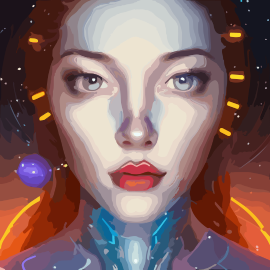
AiShot to nowoczesny generator avatarów AI, który wykorzystuje głębokie uczenie do analizy rysów twarzy, oświetlenia i wyrazu, a następnie tworzy wysokiej rozdzielczości, konfigurowalne awatary. W przeciwieństwie do wielu narzędzi, które dają karykaturalne efekty, AiShot stawia na fotorealizm, zachowując Twoją unikalną tożsamość, jednocześnie zwiększając atrakcyjność wizualną. Skierowany jest do szerokiego grona odbiorców—od profesjonalistów potrzebujących korporacyjnych zdjęć portretowych po twórców pragnących fantazyjnych portretów. Platforma jest dostępna przez przeglądarkę oraz aplikacje mobilne (iOS i Android), co zapewnia wygodę użytkownikom w podróży.
Kluczowe funkcje AiShot
- Super realistyczne awatary: AI AiShot zachowuje teksturę skóry, szczegóły włosów, okulary i zarost, generując obrazy wyglądające jak prawdziwe zdjęcia.
- Ponad 50 szablonów stylów: Wybierz spośród korporacyjnych zdjęć portretowych, casualowych portretów, artystycznych interpretacji, historycznych motywów, futurystycznych wyglądów i wielu innych. Nowe style są dodawane co miesiąc.
- Rozdzielczość 4K: Wszystkie awatary są renderowane w rozdzielczości do 4K, odpowiedniej do druku lub wyświetlaczy HD.
- Szybkie generowanie: Wyniki pojawiają się w ciągu 20–30 sekund, idealne do szybkich realizacji.
- Przetwarzanie wsadowe: Prześlij do 50 zdjęć jednocześnie w planach Pro lub Lifetime, aby generować spójne awatary dla zespołów lub wielu profili.
- Usuwanie i zmiana tła: Automatycznie usuwaj lub zmieniaj tło jednym kliknięciem.
- Prywatność przede wszystkim: Przesłane zdjęcia są szyfrowane i automatycznie usuwane w ciągu 24 godzin po przetworzeniu. AiShot nie udostępnia ani nie przechowuje Twoich danych.
- Wieloplatformowość: Działa w każdej nowoczesnej przeglądarce oraz poprzez dedykowane aplikacje mobilne na iOS i Android.
Jak działa AiShot?
Korzystanie z AiShot jest proste. Najpierw prześlij wyraźne selfie lub portret (JPG, PNG lub WEBP; maks. 10 MB). Następnie wybierz pożądany styl z obszernej biblioteki—opcje obejmują „Professional Headshot” po „Fantasy Elf” lub „Cyberpunk Warrior”. Możesz również wybrać tło (lub pozwolić AI je usunąć). Następnie dostosuj parametry, takie jak wiek, wyraz twarzy i intensywność oświetlenia. AI przetwarza Twoje zdjęcie i w ciągu kilku sekund prezentuje galerię wygenerowanych awatarów. Możesz dodatkowo dopracować wyniki za pomocą opcji „professional retouch”, aby wygładzić skórę lub podkreślić oczy. Po zakończeniu pobierz obraz w wielu formatach (JPG, PNG, SVG) z prawem do użytku komercyjnego w płatnych planach.
Ceny i plany
AiShot oferuje model freemium. Bezpłatni użytkownicy otrzymują 5 podstawowych generacji awatarów z znakami wodnymi i rozdzielczością 720p. Plany płatne zaczynają się od $10 za Starter Pack (50 awatarów, bez znaku wodnego, Full HD). Pro Pack za $25 obejmuje 200 awatarów, rozdzielczość 4K, priorytetowe wsparcie i przetwarzanie wsadowe. Jednorazowy zakup za $49 daje dożywotni dostęp do nieograniczonych generacji. W porównaniu do podobnych usług, AiShot jest konkurencyjnie wyceniony—zwłaszcza biorąc pod uwagę jakość wyników. Dostępna jest również 7-dniowa gwarancja zwrotu pieniędzy na wszystkie płatne plany.
Tabela porównawcza: AiShot vs. alternatywy
Podczas oceny AiShot warto zobaczyć, jak wypada na tle innych popularnych narzędzi w kategorii awatarów. Poniżej znajduje się porównanie AiShot z ośmioma alternatywami, oparte na cenie początkowej, kluczowych funkcjach i najlepszym zastosowaniu.
| Narzędzie | Cena początkowa | Kluczowe funkcje | Najlepsze dla |
|---|---|---|---|
| AiShot | $10 | Realistyczne awatary, 50+ stylów, wyjście 4K, przetwarzanie wsadowe | Profesjonalne zdjęcia portretowe, media społecznościowe, gry |
| AIFilter.Art | $2.99/mc | Twórz oszałamiające, wysokiej rozdzielczości awatary AI w kilka sekund | Produktywność |
| AI Profile Pictures | $30 | Zamień selfie w awatary w jakości studyjnej dzięki AI | Produktywność |
| AI Avatar Generator | Bezpłatny + $6.99/mc | Zamień selfie w unikalne, wysokiej jakości awatary natychmiast | Produktywność |
| AI-Portrait | Bezpłatny/Płatny | Zdobądź awatary w jakości studyjnej ze swoich selfie w mniej niż 30 sekund | Produktywność |
| AI Profile Pic – Avatar Maker | Bezpłatny + $3.99 | Zamień zwykłe selfie w wysokiej jakości, konfigurowalne awatary w kilka sekund | Produktywność |
| Aivatar.pics | Od $20 | Generuj oszałamiające awatary AI w kilka sekund z ponad 100 stylami | Produktywność |
| AI Time Machine | Bezpłatny/Płatny | Zamień pojedyncze selfie w podróżujące w czasie awatary z AI | Produktywność |
| 1PhotoAI | $9.9 | Zamień pojedyncze selfie w oszałamiające, wysokiej rozdzielczości awatary | Produktywność |
Porównania kontekstowe
Chociaż AiShot jest silnym uniwersalnym narzędziem, inne narzędzia wyróżniają się w określonych niszach. Na przykład AI-Portrait jest doskonały do artystycznych autoportretów, ale brakuje mu różnorodności stylów, którą oferuje AiShot. Aivatar.pics oferuje ponad 100 stylów—więcej niż 50+ AiShot—ale jego wyniki mogą być czasami mniej realistyczne. AI Profile Pictures to opcja premium za $30, skupiająca się na zdjęciach portretowych w jakości studyjnej, ale jej status beta może ograniczać niezawodność. AI Avatar Generator (innego dewelopera) umożliwia generowanie na podstawie podpowiedzi tekstowych, co jest innowacyjne, ale często produkuje mniej spójne rysy twarzy. Dla użytkowników mobilnych AI Profile Pic – Avatar Maker to solidny wybór, ale jego darmowa wersja jest ograniczona. AI Time Machine jest zabawny do historycznych kostiumów, ale mniej odpowiedni do profesjonalnych zdjęć portretowych. 1PhotoAI i AIFilter.Art to budżetowe alternatywy, ale mogą nie dorównywać rozdzielczości i możliwościom przetwarzania wsadowego AiShot. Ostatecznie AiShot osiąga równowagę między realizmem, różnorodnością stylów i przystępną ceną.
Podsumowanie
AiShot wyłania się jako jeden z najlepszych graczy w dziedzinie generowania awatarów AI na 2026 rok. Jego realistyczne efekty, ogromna biblioteka stylów, wysoka rozdzielczość i silna polityka prywatności czynią go doskonałym wyborem dla profesjonalistów, twórców i zwykłych użytkowników. Mimo że darmowi użytkownicy napotykają znaki wodne i ograniczone funkcje, plany płatne są rozsądnie wycenione—szczególnie opcja dożywotnia. Dla tych, którzy potrzebują spójnych awatarów dla zespołu lub szybkiej odświeżenia zdjęcia portretowego, AiShot dostarcza szybkość i jakość. W połączeniu z łatwym dostępem wieloplatformowym jest to narzędzie warte wypróbowania. Odkryj AiShot już dziś i podnieś swoją cyfrową obecność.
Zalety
- Generuje bardzo realistyczne awatary
- które zachowują podobieństwo twarzy
- teksturę skóry
- oraz szczegóły takie jak okulary czy brody.
- Oferuje ponad 50 unikalnych szablonów stylów
- od korporacyjnych zdjęć portretowych po fantastyczne motywy
- z comiesięcznymi dodatkami.
- Produkuje obrazy w rozdzielczości 4K
- odpowiednie do profesjonalnego druku i wyświetlaczy HD.
- Szybki czas generowania (20–30 sekund) umożliwia szybką realizację projektów.
- Przetwarzanie wsadowe pozwala na przesłanie do 50 zdjęć jednocześnie
- idealne dla spójności zespołu lub wielu profili.
- Silna polityka prywatności z szyfrowaniem przesyłanych danych i automatycznym usuwaniem po 24 godzinach; brak udostępniania danych.
- Wieloplatformowe wsparcie przez przeglądarkę oraz dedykowane aplikacje mobilne na iOS i Android.
- Konkurencyjna cena z hojnym darmowym poziomem (5 generacji) i opcją dożywotniego zakupu za $49.
- Zawiera wbudowane usuwanie/zamianę tła oraz profesjonalne narzędzie do retuszu.
Wady
- Darmowa wersja generuje obrazy z znakiem wodnym i ograniczone do 720p.
- Dostosowywanie wyrazu twarzy jest ograniczone do kilku presetów; brak precyzyjnej kontroli.
- Okazjonalne artefakty w skomplikowanych tłach lub nietypowych warunkach oświetleniowych.
- Brak oficjalnego API dla programistów do integracji generowania awatarów w aplikacjach zewnętrznych.
- Niektóre premium szablony stylów wymagają dodatkowych kredytów lub wyższego planu.
- Czas odpowiedzi obsługi klienta może być wolniejszy dla użytkowników darmowego poziomu.